File Manager Problem
Whilst creating a link to a file: Highlight text, click Create Link icon, click Browse Server, click Switch to File Manager.
Page is displayed, heading Listings for expFile, under this a link Create a new expFile. Click on the link and you get a page not found error page.
-
 Capture.JPG
41.2 KB
Capture.JPG
41.2 KB
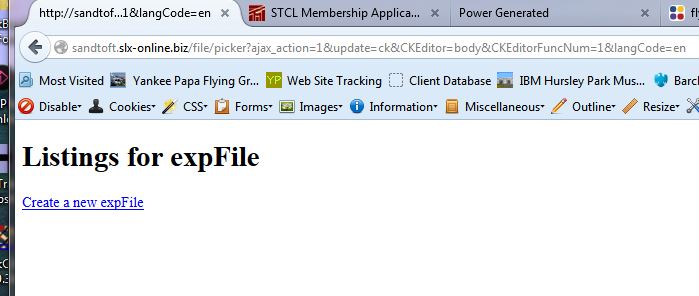

-
 peters@slx-online.biz
- Assigned user set to expNinja
I am using 2.3.0 and CKEditor. FileManager is fine for insert image and Files-FileManager. Peter.
-
-
peters@slx-online.biz
The file picker.tpl is present, also picker_cke.tpl.
-
peters@slx-online.biz
If I type in the url into a browser window that is used to add an image to the page, I get File Manager as expected:
http://sandtoft.slx-online.biz/file/picker/ajax_action/1/update/ck/...
If I use the URL that Exponent uses when I want add a link to a file I get the expFile page:
http://sandtoft.slx-online.biz/file/picker?ajax_action=1&update...
As I do not know the inner workings, I am puzzled that the link that works uses /file/picker/ajax_action/ whereas the one that doesn't uses /file/picker?ajax_action= . Please try these links on my site to see the problem. This is now slowing me down as I try to populate pages.
Thanks.
-
peters@slx-online.biz
This is strange. I believe the server is running Linux Apache 2, it is a shared server at Fasthosts.
In an earlier problem #1163 File Manager Problems - New Installation I had file manager problems that were cured by deleting a .htaccess file which you said should not have made any difference. So there seems to be some sort of compatibility problem?
I have not had any other URL problems.
-
peters@slx-online.biz
In case it helps, attached an extract from Fasthosts help regarding .htaccess.
-
 fh-htaccess.txt
1.72 KB
fh-htaccess.txt
1.72 KB
-
-
peters@slx-online.biz
I have just installed a copy of the web site onto a server from a different provider, and the File Manager seems to work OK there. Therefore it looks like there is something within the standard Fasthosts server setup that is causing this problem. For now I've moved development to the other server, so if you'd like to access the Fasthosts version for diagnostic purposes please let me know and I'll give you a login.
BTW - I have found an incompatibility between FileManager and Firefox Download Manager Tweak Extension 1.0.7. When you make a selection from FileManager the browser window remains open. The FileManager tab closes but in the process Firefox has opened a couple of Downloads tabs which remain open.
-
peters@slx-online.biz
That's when using FileManager normally from within Exponent while using the text editor - adding links or graphics and clicking Browse Server. I can't say if it happens under other circumstances as that's the only way I have been using it.
Please Sign in or create a free account to add a new ticket.
With your very own profile, you can contribute to projects, track your activity, watch tickets, receive and update tickets through your email and much more.